
A good meditation video doesn’t need much to happen, sometimes the whole point is that almost nothing does. A candle flickering. Water moving slowly. Light shifting across a wall for several minutes. Text to video tools like Dreamina can build exactly that kind of stillness now. Dreamina’s Seedance 2.5 is patient enough with slow, minimal motion that a calming scene actually stays calming instead of feeling restless.
Why stillness is harder to generate than it looks
Most video content is built around things happening, a cut, a reveal, some kind of forward motion. A meditation scene asks for the opposite, and that restraint is actually a specific skill for a model to get right. Describing slowness and near-stillness clearly is what keeps Seedance 2.5 from defaulting to something more eventful than the scene actually needs.
Choosing the kind of stillness that suits your purpose
Not all calm scenes serve the same mood, so it helps to know what feeling you’re aiming for before writing the prompt. A few directions tend to work particularly well:
- Water-based scenes, like gentle waves or a slow-moving stream
- Light-based scenes, like sun creeping slowly across a wall or floor
- Nature scenes with minimal motion, like leaves swaying softly in low wind
Pick one clear source of gentle motion. Combining several competing ones in the same scene just makes it feel busy — the opposite of what you’re going for. Even two soft movements happening at once can start to feel cluttered in a scene built entirely around calm.
Choosing the kind of stillness that suits your purpose
Consider where the viewer’s eye would want to settle while meditating. It is easier for the viewer to achieve a feeling of stillness when there is only one point of focus rather than many. A single
candle, a single leaf floating in water, or a beam of light hitting a single point – all of these are elements that hold the viewer’s gaze without making any demands. Seedance 2.5 usually performs well in creating this type of composition when the prompt specifies the point of focus explicitly rather than describing the whole scene and leaving it up to the model to find its own points of interest.
What makes a meditation prompt actually calming
A prompt that’s too busy undercuts the whole purpose. A calming one names a single, slow source of movement and describes the pace directly — “gently,” “slowly,” “barely perceptible.” Naming the pace matters here more than almost any other kind of prompt, since the entire point is restraint, not energy.
Your three step path from idea to finished scene
Step 1: Enter your prompt and add a reference if you have one
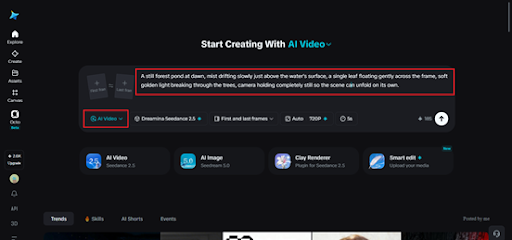
Head to Dreamina’s AI Video section. Got a reference photo of a similar calming setting? Upload it through “Add reference image” to anchor the scene. Working purely from text to video, skip that and describe the scene in detail instead.
Here’s an idea: A still forest pond at dawn, mist drifting slowly just above the water’s surface, a single leaf floating gently across the frame, soft golden light breaking through the trees, camera holding completely still so the scene can unfold on its own.
Step 2: Choose Seedance 2.5 and generate
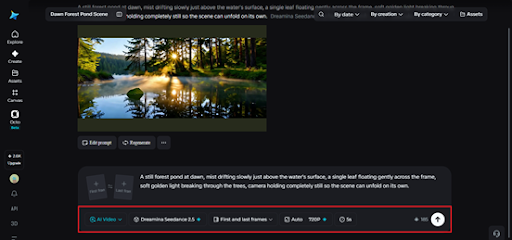
Select Seedance 2.5 once the prompt’s ready, it handles slow, minimal motion without rushing it. Pick a length that fits the purpose (longer clips tend to suit meditation content well), then an aspect ratio: 16:9 for a screen or projector, 9:16 for mobile use. Generate, give it a few seconds.
Step 3: Refine the pace and export
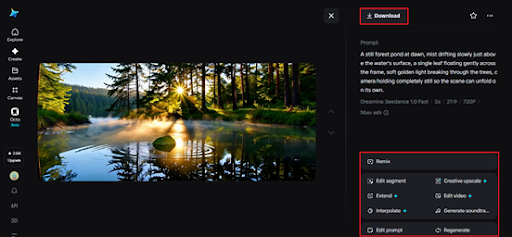
Check that the motion still feels unhurried before finishing up. Upscale sharpens fine detail like mist or water texture. Generating a soundtrack adds a soft ambient layer, gentle rain, distant birdsong, quiet wind. Export once the pacing feels right wherever it’s headed.
Meet Seedance 2.5, the model with cleaner output and less cleanup
A lot of Seedance 2.5 updates are about what creators don’t have to fix afterwards.
No more stray subtitles or random music
The generation has stabilised to such an extent that it is capable of addressing the issue of random subtitles and background music popping up without reason.
Less “AI look,” more physical texture
There is improved realism in texture and weight, increased consistency in cuts and a better ability to perform complicated long-tail actions which were not possible before.
Sound and camera control after the fact
It is now possible to extract background music from films while retaining character voices and on-screen visuals, and it is also possible to change the camera viewpoint after the event, even deducing details about the spatial arrangement not discernible in the original scene.
Choosing light and colour that support relaxation
Colour does a lot of the emotional work in a meditation scene, since there’s rarely anything else competing for attention. Warm, soft tones tend to feel comforting. Cooler blues and greens often feel more grounding, more spacious. Deciding that palette before writing the prompt shapes how the whole scene lands.
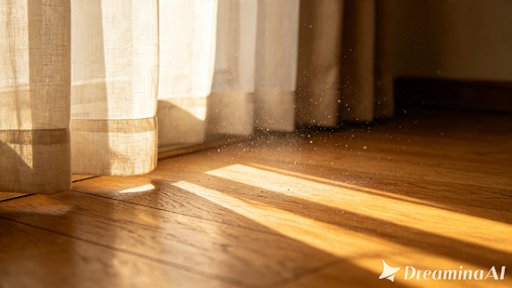
Where these calming scenes are already being used
These clips have found steady use well beyond personal relaxation. Wellness apps use them as backgrounds for guided meditation sessions. Therapists sometimes lean on similar visuals during mindfulness exercises. Yoga studios use looping calm scenes during classes or in waiting areas. A quiet moment that used to require actual footage from a hard-to-reach location can now be generated from a written description — and thanks to Seedance 2.5, it holds the kind of stillness that actually helps someone settle down.
Creating a genuinely calming scene used to mean sourcing stock footage that never quite matched the mood you wanted. With Dreamina and the patient precision of Seedance 2.5, that exact feeling of stillness can be built from a few careful sentences. It finally matches the specific kind of calm you had in mind, not just the closest available substitute someone else happened to film.
 A Guide to Different Types of Mattresses and Who They Are Best Suited For
 Term Insurance Tax Benefits in India: How They Compare With Return of Premium Plans
 Planning a spiritual getaway to Ayodhya? Here is everything you need to know
 Celebs Have a New “Yellow Cap Lip Balm” Obsession, and the Internet Is Playing Detective 👀💛