• About Us
  • Contact Us
Friday, November 27, 2026
Shop Rawbare
RVCJRVCJ Media
No Result
View All Result
  • Reviews
  • Buzz
  • Sports
  • Travel
  • Videos
  • Extras
  • News
  • Viral
  • Reviews
  • Buzz
  • Sports
  • Travel
  • Videos
  • Extras
  • News
  • Viral
No Result
View All Result
RVCJRVCJ Media
No Result
View All Result
Home Extras

No Need To Carry Debit Cards! Samsung Pay App Allows You To Swipe Cards On POS Using Your Mobile

by Pooja S
in Extras
Reading Time: 2 mins read
No Need To Carry Debit Cards! Samsung Pay App Allows You To Swipe Cards On POS Using Your Mobile - RVCJ Media

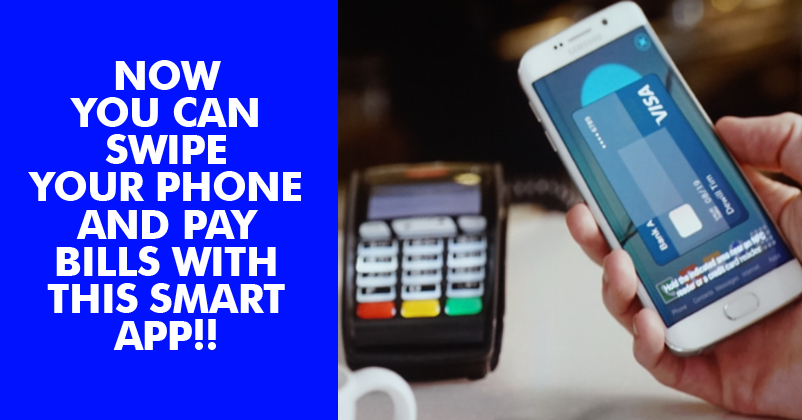
Samsung along with Mastercard, has extended its support to Modi’s Digital India drive, by launching Samsung Pay, a digital payment app. There’s no need of carrying your cards anywhere; all your payments will be managed in a hassle free manner through this application. It’s an all in one payment app and supports all your debit cards, credit cards and digital wallets; so next time you are out shopping, make use of this app as it’s no less than a blessing.

No Need To Carry Debit Cards! Samsung Pay App Allows You To Swipe Cards On POS Using Your Mobile - RVCJ Media

Samsung Pay was launched in India yesterday, and it is supportive of devices like Galaxy A7 (2016), Galaxy A5 (2016), Galaxy S6 Edge+, Galaxy S7 Edge, Galaxy S7 and Galaxy Note 5.

No payment terminal is required because this application works on MST i.e. Magnetic Secure Transmission and NFC i.e. near field communication. Usually, for cards, it is necessary to have a reading machine or a card swiping machine, but this application drives away the need for them and allows you to swipe the cards on a POS through your phone.


RELATED STORIES

DYK Why Do Charging Cables Have Tiny Ridges Near The Connector?

DYK Why Do Charging Cables Have Tiny Ridges Near The Connector?

Ananya Panday Opens Up About Her Breakups, Marriage Plans And Being Single

Shraddha Arya Takes A Jibe At Gaurav Khanna’s Wife Akanksha Chamola Amid Divorce Buzz

Just waving the card over the terminal is enough; there is no need of physically swiping it. Firstly the card details and bank account should be linked on the app, provided the phone is compatible.

Once the details are saved, you can make payments in no time. Just get the phone close to the card swiping machine (NFC enabled) and you are done! While making the payments, the authentication is done using the fingerprint or the PIN.

You might be wondering how this is possible, isn’t it? Well, watch the video below and you will understand every detail of this process.

Check it out;

[yt]https://www.youtube.com/watch?v=HoR666WOdac[/yt]


Follow these steps to install and activate Samsung Pay:

Look for the Samsung Pay icon on your device.

Option A: If you have installed the Android software update and you can see the Samsung Pay icon on your device, follow the below steps:

ADVERTISEMENT

Step 1: Ensure that you have Samsung Account added (Settings > Accounts > Add Samsung Account).

Step 2: Click on Samsung Pay icon to download and install the Samsung Pay app.

Step 3: Setup Samsung Pay & start using the revolutionary way to pay.

Option B: If you do not find the Samsung Pay icon on your device, please ensure that the device software is updated to the latest Android software

Step 1: To check go to Settings > About device and update the software.

Step 2: Once this is done, you should be able to see the Samsung Pay Icon on your device.

Please follow the above mentioned steps to get started.

This technology is superb! It will definitely add a lot of security to the system, don’t you think so? Have you downloaded it? Share your views in our comments section below.


Latest on RVCJ

  • Robot Wars, Drone Races and Hackathons: Inside KRMU’s AI Arena at IDEAS 4.0
  • Is a Dealer’s Recommended Car Insurance Policy Always the Right Choice?
  • Yuvraj Singh’s 30-Min Call Changed Everything, Vaibhav Sooryavanshi Reveals Secret Behind 204
  • Usman Khawaja Didn’t Expect Personal Comments From Pat Cummins Over Sandpapergate Row
  • Harbhajan Singh Backs Shubman Gill, Wants ICC To Change Rules Regarding Saliva Ban
  • Jasprit Bumrah Reaches Joint No. 2 In ICC Test Rankings, KL Rahul, Gill & Jaiswal Also Gain Big
  • Iceland Cricket Takes A Funny AI Dig At Nvidia CEO After Vaibhav Sooryavanshi’s Historic 204
  • Priyansh Arya Creates History With 181-Run Knock, Equals T20 World Record For….
More from ExtrasSee all
GTA 6 Memes: 11 Viral Jokes Indian Fans Are SharingGTA 6 Memes: 11 Viral Jokes Indian Fans Are SharingGTA 6 Gift Ideas Under Rs 7,500 in India (Christmas 2026)GTA 6 Gift Ideas Under Rs 7,500 in India (Christmas 2026)Best PS5 Accessories for GTA 6 in India (November 2026)Best PS5 Accessories for GTA 6 in India (November 2026)Best PS5 SSD for GTA 6 in India (November 2026)Best PS5 SSD for GTA 6 in India (November 2026)
Pooja S

Pooja S

ADVERTISEMENT
Facebook Twitter Instagram Youtube

About Us

RVCJ Media is a digital-first media and entertainment company known for pioneering meme marketing and shaping internet culture in India.

RVCJ Digital Media Pvt. Ltd., Andheri (East), Mumbai 400093
Email: [email protected]

ADVERTISEMENT

Quick Links

  • Home
  • About Us
  • Contact Us
  • Terms & Conditions
  • Privacy Policy

Sections

  • Buzz
  • Bollywood
  • Sports
  • Reviews
  • Videos
  • Viral
  • Travel

© RVCJ Digital Media Pvt Ltd. All rights reserved.

RVCJ

Born on the internet & built for scale. Bollywood, cricket, reviews and the stories India is sharing.

Follow RVCJ
91M followers across platforms
Sections
  • Buzz
  • Bollywood
  • Sports
  • Reviews
  • Videos
  • Viral
  • Travel
Company
  • About Us
  • Contact Us
  • Privacy Policy
  • Terms of Service
Work with RVCJ

Branded content, meme marketing and campaigns for brands that want India talking.

Get in touch
ADVERTISEMENT
© RVCJ Digital Media Pvt. Ltd. All rights reserved.Part of RVCJ Media Group
As an Amazon Associate, we earn from qualifying purchases.
No Result
View All Result
  • Reviews
  • Buzz
  • Sports
  • Travel
  • Videos
  • Extras
  • News
  • Viral
This website uses cookies. By continuing to use this website you are giving consent to cookies being used. Visit our Privacy and Cookie Policy.