• About Us
  • Contact Us
Thursday, November 5, 2026
Shop Rawbare
RVCJRVCJ Media
No Result
View All Result
  • Reviews
  • Buzz
  • Sports
  • Travel
  • Videos
  • Extras
  • News
  • Viral
  • Reviews
  • Buzz
  • Sports
  • Travel
  • Videos
  • Extras
  • News
  • Viral
No Result
View All Result
RVCJRVCJ Media
No Result
View All Result
Home Technology

How To Trigger SOS On Your Iphone In Case Of Emergency

by Shambhavi Vijai
in Technology
Reading Time: 2 mins read
How To Trigger SOS On Your Iphone In Case Of Emergency - RVCJ Media

Technology came into our lives to make it easier and make us stay connected to the ones we love and care. But what would happen if you are stuck in that corner of the world where no loved one can help you or reach you. You will definitely need to contact the emergency numbers which is different in different countries and not at all easy to remember all of them.

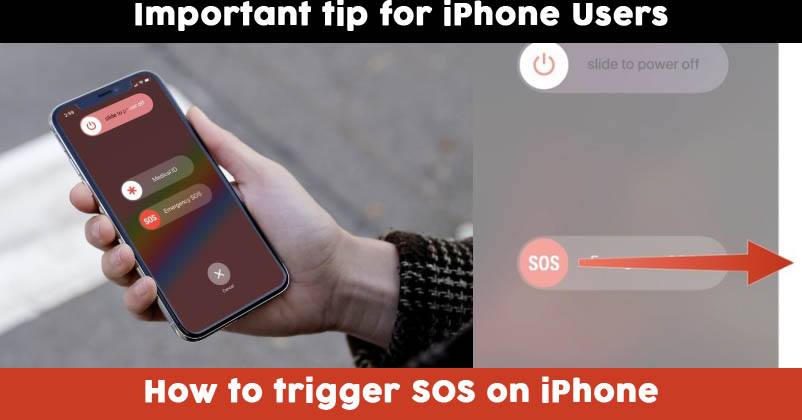
If you are an iPhone user then I have a piece of good news for you. Do you know that your iPhone has a feature which helps you connect to your nearest emergency contacts in case you have one? It is called emergency SOS and it is very easy to trigger.

How to activate the SOS feature in your iPhone 8 and newer:

1. Press the Side Button on your mobile and either of the Volume Buttons simultaneously.

2. Continue to do so for a few seconds until the SOS emergency countdown begins.

3. Swipe right on the Emergency SOS switch and activate the call immediately.

Your phone will automatically call the emergency services near you.

How to activate the SOS feature in your iPhone 7 and older:

RELATED STORIES

Apple Pay Is Finally Live In India

Apple Pay Is Finally Live In India: Which Cards Work, How To Use It And What Is Missing

Red iPhone Got Traded For A Plate Of Pav Bhaji In Goa, This Incident Will Leave You In Splits

Red iPhone Got Traded For A Plate Of Pav Bhaji In Goa, This Incident Will Leave You In Splits

ADVERTISEMENT

1. Press the side top button rapidly five times. In India, you only require to press the button three times.

2. Drag the Emergency SOS slider appeared on the screen in order to call emergency services.

Right after the call is disconnected your iPhone sends your Emergency contacts a text message with your current location unless you cancel it. If your location service is off, your iPhone automatically turns it on temporarily. In case you change your location, your contacts will get an update.

It is surprising to know how much technology can do and saves you from shouting for help and letting others know that you are in trouble.

Latest on RVCJ

  • Anshul Kamboj’s Powerful Response After West Indies Debut, Says One Match Can’t….
  • Rohit Sharma Steals The Show Despite 6-Ball Duck, Shubman Gill Praises His Fielding Effort
  • Virat Kohli Breaks Sachin Tendulkar’s All-Time ODI Record, Creates History In….
  • IND vs NZ 1st ODI: Kohli’s 74 Seals 5-Wicket Win In Auckland
  • Benefits and Limitations of Investing in ULIP Schemes
  • Shraddha Kapoor Reveals Reason Behind Refusing Big Offers After Stree 2, Says She Feels Proud
  • Riteish Deshmukh & Priyadarshan Not A Part Of Malamaal Weekly 2? Here Is What We Know
  • Forget Joe Root & Harry Brook, This 32-Year Pacer Wins England Cricketer Of The Year 2026 Award
More from TechnologySee all
10 Daily Use Gadgets for Home Every Indian Family Needs10 Daily Use Gadgets for Home Every Indian Family NeedsAadhaar Card PDF Password: How to Download e-Aadhaar in 2026Aadhaar Card PDF Password: How to Download e-Aadhaar in 2026
Tags: Emergency callsEmergency contactsEmergency SOSHere's How You Can Make "Emergency Calls" Even When There's No Network Coverage.!!iphoneSOS
Shambhavi Vijai

Shambhavi Vijai

ADVERTISEMENT
Facebook Twitter Instagram Youtube

About Us

RVCJ Media is a digital-first media and entertainment company known for pioneering meme marketing and shaping internet culture in India.

RVCJ Digital Media Pvt. Ltd., Andheri (East), Mumbai 400093
Email: [email protected]

ADVERTISEMENT

Quick Links

  • Home
  • About Us
  • Contact Us
  • Terms & Conditions
  • Privacy Policy

Sections

  • Buzz
  • Bollywood
  • Sports
  • Reviews
  • Videos
  • Viral
  • Travel

© RVCJ Digital Media Pvt Ltd. All rights reserved.

RVCJ

Born on the internet & built for scale. Bollywood, cricket, reviews and the stories India is sharing.

Follow RVCJ
91M followers across platforms
Sections
  • Buzz
  • Bollywood
  • Sports
  • Reviews
  • Videos
  • Viral
  • Travel
Company
  • About Us
  • Contact Us
  • Privacy Policy
  • Terms of Service
Work with RVCJ

Branded content, meme marketing and campaigns for brands that want India talking.

Get in touch
ADVERTISEMENT
© RVCJ Digital Media Pvt. Ltd. All rights reserved.Part of RVCJ Media Group
No Result
View All Result
  • Reviews
  • Buzz
  • Sports
  • Travel
  • Videos
  • Extras
  • News
  • Viral
This website uses cookies. By continuing to use this website you are giving consent to cookies being used. Visit our Privacy and Cookie Policy.